
Gaming performance depends on more than just a powerful graphics card or processor. Keeping graphics drivers updated is an essential part of gaming PC optimization, helping improve FPS and deliver smoother gameplay. Updated drivers include game-specific optimizations, bug fixes, and compatibility improvements that help your GPU run the latest games more efficiently. Whether you are playing competitive shooters or graphically demanding AAA titles, the right drivers can make a noticeable difference. In this guide, discover the best driver updater known as Driver Booster and how it helps unlock hidden FPS.
Part 1: Why Does FPS Matter in Gaming?
FPS (Frames Per Second) measures how many individual images appear on a screen every second. A higher FPS delivers smoother, more fluid motion — whether you’re gaming, watching video, or editing animation. A higher FPS leads to:
- Smoother Gameplay: Higher FPS makes character movements, camera rotations, and in-game animations appear more fluid.
- Faster Response Times: Higher frame rates can reduce the delay between your input and the action displayed on the screen, helping you react faster during gameplay.
- Improved Accuracy: High FPS delivers smoother on-screen movements, making it easier for gamers to track moving targets and aim precisely.
- Reduce Motion Blur: Higher FPS can make fast-moving objects easier to follow, especially when paired with a suitable monitor and response time.
Part 2: Best Tool to Unlock Hidden FPS: Driver Booster

High FPS can make your gameplay smoother and more responsive, but outdated graphics drivers may prevent your PC from delivering the best possible performance. That is where Driver Booster comes in. The program scans your system to identify outdated drivers and helps you update them without manually searching for each driver. It supports graphics driver updates that may include game-specific optimizations, bug fixes, and compatibility improvements for newer games. The best part of this tool is that it supports over 23 million drivers from 1200+ manufacturers, such as Intel, ASUS, AMD, NVIDIA, Lenovo, Dell, HP, Microsoft, Logitech, Canon, Brother, MSI, LG, Song, Samsung, and TP-Link.
Part 3: Booster Features That Help Unlock Hidden FPS
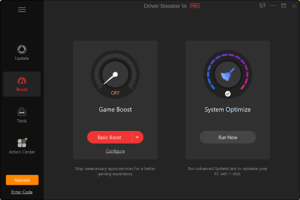
The program includes a wide range of amazing features that enable users to unlock hidden FPS and enjoy smoother gameplay. Here are the top features of this driver updater:
- Update Game-Ready Drivers: Game-Ready Drivers mainly refer to game accelerators that offer new features, fix bugs, unlock hidden FPS, and improve gaming performance. With this feature, you can easily update video card drivers like NVIDIA GeForce Game Ready, AMD Radeon Software Adrenalin Edition, and Intel Graphics Drivers.
- Huge Driver Library: Driver Booster includes 23 million+ drivers from 1200 manufacturers, such as Intel, Dell, NVIDIA, Lenovo, and more. This extensive database helps users find suitable driver updates for a wide range of hardware components and devices.
- Backup and Restore: It is one of the most useful features of Driver Booster. It enables users to back up existing drivers before installing updates, providing an additional layer of protection. If a newly installed driver causes compatibility issues, users can always restore to the previous version.
- Dual Certification: Driver Booster never compromises on its security. All drivers available on this tool are WHQL-certified and tested by IObit. This helps reduce the risk of installing incompatible or unreliable drivers. For gamers, it helps maintain a stable gaming environment.
- Intuitive Interface: The program offers an easy-to-use and simple interface, which is ideal for non-tech and beginner users. Simply click on the “Scan” button, and Driver Booster will find and update outdated drivers to the latest version — all without any manual effort.
Part 4: How to Unlock Hidden FPS with Driver Booster in 2026?
Simply updating the graphics drivers to the latest version can improve the gaming experience and help unlock hidden FPS. Here is how to update graphics drivers with Driver Booster:
- Go to the Driver Booster official site and download the latest version of the program for your PC. Launch it and click on the “Scan” button to begin the scanning process.
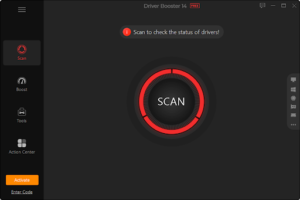
- Driver Booster will search for outdated, missing, or faulty drivers. Once the scan is complete, a list of outdated drivers will appear on your screen. Simply click on the “Outdated Drivers” option to select all drivers.
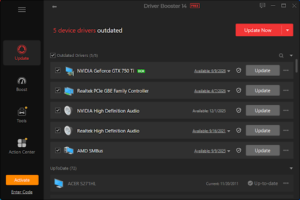
- Next, click on the “Update Now” button to begin the updating process. Driver Booster will automatically download the latest driver and install it on your PC. Once the installation is finished, restart your PC to apply changes.
Part 5: FAQs Related to Driver Booster
-
Is Driver Booster Free to Use?
Yes, Driver Booster 14 is available for free. With this tool, users can update their drivers to the latest version without spending a single penny. The tool also offers a paid version, which includes advanced features.
-
Can Driver Booster Increase FPS in Games?
Driver Booster can help update outdated graphics drivers that include game-specific optimizations and performance improvements. With the help of this tool, you can easily unlock hidden FPS and enjoy smoother gameplay.
Final Thoughts
Gaming PC optimization is essential for achieving smoother gameplay, better responsiveness, and stable performance. Keeping graphics drivers updated can help improve compatibility with the latest games, fix graphics-related issues, and increase FPS when new drivers include performance optimizations. Driver Booster makes this process easier by automatically scanning for outdated drivers and helping you install available updates from a single interface.