QUICK ANSWER
Discovered – Currently Not Indexed is a Google Search Console status. It means Google knows a URL exists, usually from a sitemap or an internal link, but has not crawled it yet. Google postpones the crawl when it expects low value from the page or when crawling might overload your server. The fix is rarely a resubmission. Strengthen internal links to the page, remove thin or duplicate URLs, improve server response time, and make the content clearly useful. New sites often wait days to weeks. If a page stays in this status after about 30 days despite solid links and content, treat it as a quality signal, not a technical glitch.
KEY TAKEAWAYS
- It is a crawl problem, not an indexing verdict: Google has not fetched the page, so it has not judged the content yet.
- Internal links carry the most weight: a page with zero or one internal link is the most common case in this status.
- Sitemap bloat hurts: submitting thousands of low-value URLs lowers the priority of your good ones.
- Patience has a limit: new domains can wait weeks, but a page stuck beyond 30 days needs a real change.
What the Status Actually Means
Open the Page indexing report in Google Search Console and you will see a list of reasons why pages are not indexed. One of them reads “Discovered – currently not indexed.” Google’s own documentation on the Page indexing report explained groups it under pages that were found but not yet crawled.
Here is the sequence. Google finds a URL through a sitemap, a link, or a redirect. It adds the URL to a crawl queue. Later, Googlebot fetches the page, reads it, and decides whether to index it. This status means your URL is still sitting in the queue.
The page has not failed anything. Google has simply not looked at it. That distinction matters because the fixes are different from the fixes for pages Google crawled and rejected.
Discovered vs. Crawled: Two Statuses People Confuse
Search Console shows a similar label: “Crawled – currently not indexed.” The two are not the same problem.
Discovered – currently not indexed: Google knows the URL but has not fetched it. The bottleneck is the crawl decision.
Crawled – currently not indexed: Google fetched the page, read it, and chose not to index it. The bottleneck is content quality or duplication.
If you mix them up, you waste weeks. Rewriting a great article will not help if Googlebot never opened it. Adding internal links will not help if Googlebot already read the page and found it thin.
Why Google Delays the Crawl
Google has never published a single formula. The pattern across publisher sites and SaaS blogs is consistent, though, and it points to five main causes.
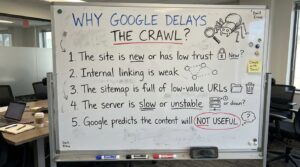
1. The site is new or has low trust
A fresh domain has no crawl history. Google does not know whether your pages deserve frequent visits, so it starts cautiously. A new blog with 200 posts published in one week looks very different from a site that grows at a natural pace.
2. Internal linking is weak
Googlebot follows links. A URL that appears only in the sitemap, with no links from other pages, tells Google that you do not consider it important. Orphan pages and pages buried five clicks deep sit in this status the longest.
3. The sitemap is full of low-value URLs
Tag archives, filtered category pages, parameter URLs, and thin author pages all compete for crawl attention. When Google samples a section and finds mostly weak pages, it lowers the priority of the whole section. Your best article gets caught in the same discount.
4. The server is slow or unstable
Google adjusts crawl speed to avoid damaging your site. If response times are high or you return occasional 5xx errors, Googlebot backs off. Shared hosting with traffic spikes is a classic cause. Google explains this in its guide to managing crawl budget on large sites.
5. Google predicts the content will not be useful
This one is uncomfortable. Google can estimate page quality from patterns across a section of your site before it fetches an individual page. If earlier pages in the same URL pattern were thin, duplicated, or templated, the rest get queued behind better candidates.
How to Diagnose Your Own Case
Do not guess. Work through these checks in order.
Step 1: Count the affected URLs.
In Search Console, open the Page indexing report and click the “Discovered – currently not indexed” row. If you see 5 URLs, you have a page-level problem. If you see 5,000, you have a site-level problem.
Step 2: Look for a URL pattern.
Export the list and sort it. If most affected URLs share a folder, a parameter, or a template, the cause is almost always quality or duplication in that section.
Step 3: Inspect one URL.
Use the URL Inspection tool, described in Google’s help page on inspecting a single URL. Check whether the page is allowed to be crawled and what Google last saw.
Step 4: Check server health.
Open the Crawl Stats report under Settings. Look at average response time and the share of 5xx responses. An average above roughly one second is a warning sign on content pages.
Step 5: Count internal links.
Run a crawl with a desktop crawler such as Screaming Frog or the free Ahrefs Webmaster Tools. Find how many internal links point to each affected URL. Zero or one is your answer in many cases.
Fixes That Work, Ranked by Impact
| Fix | Primary Strength | Typical Time to See Effect | Cost |
|---|---|---|---|
| Add 3+ contextual internal links to the page | Raises crawl priority directly | 3 to 14 days | Free |
| Prune thin and duplicate URLs from the sitemap | Concentrates crawl attention | 2 to 6 weeks | Free |
| Upgrade hosting or add caching and a CDN | Lifts crawl rate limits | 1 to 4 weeks | Varies by host, check current pricing |
| Merge or rewrite weak pages | Fixes quality prediction for the section | 4 to 8 weeks | Time only |
| Request indexing in URL Inspection | Nudges single URLs | Hours to days, not guaranteed | Free |
| Earn real external links to the section | Signals importance | 4 to 12 weeks | Time or outreach cost |
These timelines are working estimates from common publisher experience, not guarantees from Google. Treat them as a planning range and measure your own results.
Fix 1: Build real internal links
This is the highest-return change and the cheapest. Link to the stuck page from at least three relevant, already-indexed pages. Use descriptive anchor text that matches the topic. Add the page to a hub page or a “related articles” block that sits on a well-crawled URL.
Homepage and top-category links help most, because Google crawls those often. A link from a page Googlebot visits daily is worth more than ten links from pages it visits monthly.
Fix 2: Clean the sitemap
Your sitemap should list only URLs you want indexed and that return a 200 status. Remove redirects, noindexed pages, parameter URLs, and thin tag archives. A smaller, cleaner sitemap gives Google a clearer signal about what matters.
Split large sitemaps by content type. A separate sitemap for articles lets you watch indexing rates for that section alone in Search Console.
Fix 3: Fix server response time
If your time to first byte is slow, Googlebot crawls fewer pages per visit. Enable page caching, compress images, and cut heavy plugins. On WordPress, a single bloated page builder or analytics plugin can add hundreds of milliseconds to every request.
One trap here: cheap shared hosting plans often advertise unlimited traffic and then throttle under load. Check your Crawl Stats report before you assume your host is fine.
Fix 4: Improve or merge weak content
Look at the affected pages with an honest eye. Is the article a 400-word restatement of what ten other sites already say? Does it add original data, screenshots, test results, or a real opinion?
Google’s guidance on creating helpful, people-first content is direct on this point. Pages written to attract search traffic with no added value are the ones most likely to be deprioritized. If three weak posts cover the same topic, merge them into one strong page and redirect the others.
Fix 5: Use the Request Indexing button sparingly
The button in URL Inspection can help with a single important URL. It does not fix the cause. Clicking it repeatedly for the same page changes nothing, and Google states that submitting a URL multiple times does not speed up the process.
Practitioner Tip
Before you request indexing for any page, add the internal links first and wait 48 hours. Then request indexing once. In my workflow notes, the order matters: Google sees the page already connected to the site when it arrives, so the page looks like part of the site instead of an orphan. Keep a simple sheet with the URL, link count, date of request, and date indexed. After 20 or 30 entries you will see your own site’s pattern, which is worth more than any generic benchmark.
What Does Not Work
Several popular tactics waste time or create new problems.
Ping services and indexing “boosters.” Third-party tools that claim to force indexing mostly repeat what a sitemap already does. Some send low-quality signals that add noise.
The Indexing API for ordinary pages. Google documents this API for job posting and livestream pages. Using it for blog posts is outside its intended purpose, and results are unreliable.
Publishing more content faster. Adding volume to a site Google is already hesitant about makes the queue longer. Fix the existing backlog first.
Buying links to unindexed pages. Paid links can trigger a manual review and do not fix the underlying quality prediction.
How Long Should You Wait?
Patience is part of the diagnosis. These are practical ranges.
New domain, first month: Expect delays. Google is building a crawl history for your site. Focus on a clean structure and a small set of strong pages.
Established site, new post: A well-linked post on a healthy site is usually crawled within a few days. If a post sits for two weeks with proper links, something is off.
Any page past 30 days: Treat it as a signal. Check links, check the section for thin content, and decide whether the page deserves to exist.
If a page does not deserve to exist, the correct fix is removal. Delete it, redirect it to a relevant page, or merge it. Deleting weak pages is often the fastest way to improve crawl attention for the strong ones.
Special Cases for SaaS Founders and Publishers
SaaS sites with programmatic pages
Many SaaS sites generate hundreds of landing pages from a template: integrations, comparisons, location pages. If each page differs only by a name swapped into the same text, Google learns that the pattern is low value. A page like “Integrate with Tool A” and another for “Integrate with Tool B” need real differences: setup steps, screenshots, limits, and use cases.
Start with 20 well-built pages instead of 500 thin ones. Expand only after the first batch is indexed and holds rankings.
Publishers with large archives
Older archive pages, date-based URLs, and paginated lists create thousands of crawlable URLs with little unique value. Use noindex on pagination beyond the first few pages if they have no search value, and keep your best evergreen pages within three clicks of the homepage.
Sites with faceted navigation
Filter and sort parameters can multiply URLs endlessly. Block low-value parameter combinations in robots.txt and use canonical tags to point variants at the main version. Crawl budget disappears fast on filter pages.
A Monthly Monitoring Routine
A fix only matters if you can confirm it worked. Keep the routine short.
- Week 1: Export the affected URL list and record the count.
- Week 2: Add internal links and clean the sitemap. Note the date.
- Week 4: Compare the count. A falling number means your changes are working.
- Week 8: Review the URLs still stuck. Decide to rewrite, merge, or remove each one.
Track the ratio of indexed to submitted URLs in your sitemap report. A healthy site usually shows most submitted URLs as indexed. A steady decline in that ratio is an early warning that Google is losing interest in new content.
Final Verdict
Discovered – Currently Not Indexed is a priority problem, and it is not a penalty. Google has seen your URL and decided other pages deserve the crawl first. Your job is to change that ranking in the queue.
After working through this status on new blogs and SaaS sites, my verdict is simple. Internal links fix the most cases, a clean sitemap fixes the next largest group, and fast hosting removes the rest of the technical blockers. Resubmitting URLs, buying indexing tools, and publishing faster fix almost nothing.
If your site is new, give it three to four weeks while you build links and trim weak pages. If an established page sits in this status for 30 days with good links and a healthy server, the page itself is the problem. Rewrite it, merge it into a stronger article, or delete it.
Frequently Asked Questions
Is Discovered – Currently Not Indexed a penalty?
No. It is a queue status. A penalty or manual action appears in a separate report.
Will it fix itself?
Sometimes. On new sites, many pages move out of this status as trust grows. On established sites, a page stuck for weeks rarely recovers without a change.
Should I resubmit my sitemap?
Resubmitting does not help if the sitemap is unchanged. Update it first, then submit once.
Does page speed matter here?
Yes. Slow responses reduce how many pages Googlebot fetches per visit, which lengthens the queue.
Can too many URLs cause this?
Yes. A large number of low-value URLs dilutes crawl attention. Pruning often improves indexing of the pages you care about.