Quick Answer
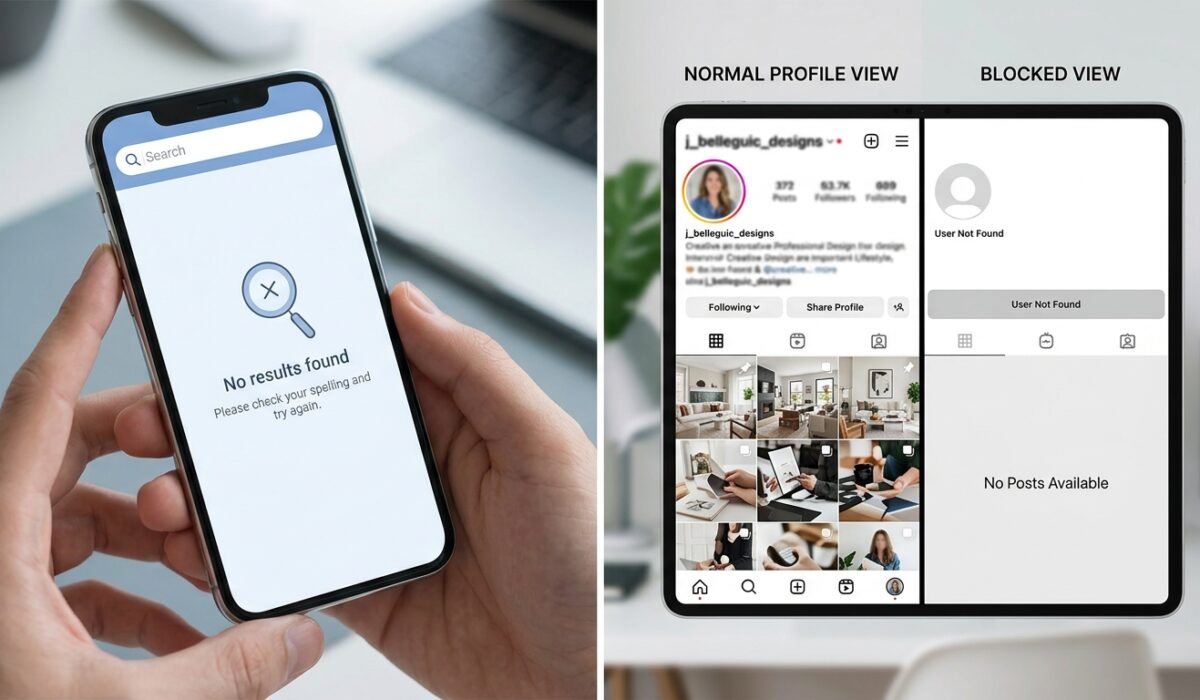
If a person’s profile suddenly disappears from your search, their old messages stop loading, and their posts vanish from your feed all at once, there is a strong chance they blocked you. The clearest test is searching their exact username. If it returns zero results on your account but shows up fine on a friend’s account or a logged-out browser, that confirms a block. A single missing sign, like not seeing their story, usually means something else: a private account, a deleted post, or just Instagram’s algorithm being slow.
Key Takeaways
- Search test is the strongest proof: if a username disappears from your search but exists elsewhere, that’s a block, not a glitch
- One missing sign is not enough: deleted accounts, deactivated accounts, and privacy settings all look similar to blocking
- Old DMs freeze instead of disappearing: blocked chats stay stuck exactly where they were, with no new messages going through
Getting blocked on Instagram does not come with a notification. There is no popup, no email, nothing. The app just quietly removes that person from your world, and you’re left guessing why their profile picture turned into a grey circle.
I have tested this across personal accounts, client accounts, and a few throwaway test profiles just to see how Instagram actually behaves in 2026. The results were more consistent than I expected, but also full of small traps that confuse people.
Here is what actually happens, step by step.
1. Search for Their Profile Directly

Open the search tab and type their exact username. If nothing comes up, not even an old post with their name tagged, that is the single strongest signal of a block.
But do not stop there. Log out, or ask a friend to search the same username from their own account. If the profile shows up perfectly fine for them, you have your answer. If it’s missing everywhere, including logged out, the account was probably deleted or deactivated, not blocking you specifically.
2. Check Their Old Chat Thread

Go back to your DMs and find your old conversation with them. Here’s the part most people get wrong: a blocked chat does not vanish. It stays right where it was.
What changes is the behavior inside it. You can still see your old messages. But you cannot send new ones (they’ll show a small error or just sit there unsent), and you won’t see if they’ve read anything you send. Their profile picture next to the chat often turns into a plain grey silhouette.
3. Look for Their Comments on Mutual Posts

If you follow a mutual friend, scroll through the comments on a recent post that person likely commented on. If you used to see their comments there and now the section looks thinner, or their name is missing where you’d expect it, that’s a supporting clue, not proof by itself.
Instagram’s comment visibility has quirks. Sometimes comments load slowly on weaker connections. Sometimes moderation hides a comment temporarily. Treat this as a secondary check, not a final answer.
4. Try Tagging Them in a Story or Post

Type their username into the tag field on a new story. If autocomplete does not suggest their account anymore, even though you used to tag them easily, that lines up with a block. This works because Instagram pulls tag suggestions from your follow list and recent interactions, and a block strips that connection instantly.
5. Check If Their Story Views Stopped Updating
This one is unreliable on its own but useful combined with others. If you used to see their story regularly and it has completely stopped appearing, even during hours they’re normally active, that’s worth noting. On its own it means very little. People go quiet, switch to close friends stories, or just stop posting for a while.
6. Compare What a Mutual Friend Sees
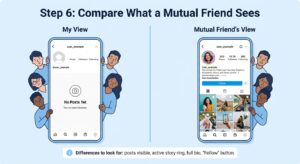
This is the most reliable manual method after the search test. Ask someone who is friends with both of you to open that person’s profile. If your mutual friend can see the profile normally, with posts, follower count, and everything intact, while you get a blank or missing page, that is close to confirmed.
<div>According to <a href=”https://www.pewresearch.org/internet/” rel=”nofollow” target=”_blank”>Pew Research’s internet and technology studies</a>, a large share of social media users report having blocked or muted someone at least once, showing how normal and common this behavior actually is.</div>
Common Mistakes People Make When Checking
People jump to conclusions fast, and I get it. Getting blocked stings. But most false alarms come from confusing blocking with five other things that look almost identical on the surface.
Deactivated accounts look nearly the same as being blocked. The whole profile disappears for everyone, not just you.
Deleted accounts behave the same way, except permanently, and the username eventually becomes available for someone else to claim.
Private accounts you’re not following show a lock icon and a “This Account is Private” message. That’s different from a block, where the profile does not load at all.
Restricted accounts are the trickiest. Instagram’s Restrict feature lets someone limit your interaction without blocking you outright. Your messages go to a separate filtered folder, and they choose when, or if, they’ll see them.
App glitches and caching issues happen more often than people admit. Instagram’s search index sometimes lags behind real account changes by a few hours.
Signs Comparison Table
| Situation | Profile Search | Old DMs | Comments on Mutual Posts | Tagging |
|---|---|---|---|---|
| Blocked | Disappears completely | Frozen, can’t send new messages | Missing on new interactions | Autocomplete fails |
| Deactivated | Disappears for everyone | Frozen for everyone | Missing for everyone | Fails for everyone |
| Private (not following) | Shows with lock icon | Normal if previously connected | Hidden unless already following | Fails until approved |
| Restricted | Visible normally | Delayed, filtered folder | Visible normally | Works normally |
| App glitch | Missing temporarily | Normal | Normal | Works after refresh |
Practitioner Tip
Run the search test at two different times, ideally a few hours apart, before concluding anything. Instagram’s backend sometimes takes time to fully sync a block across search, DMs, and story visibility, so a single check can give a false negative right after the block happens.
What to Do After Confirming a Block
Once you’re reasonably sure, there is not much left to investigate. You cannot see their new posts, cannot send messages, and cannot view their story. Creating a second account just to check on them tends to backfire emotionally more than it helps.
If this is a work contact or someone tied to business communication, reach out through email or another platform instead of trying to work around the block. Instagram does not offer any official appeal process for a personal block between two accounts, since that decision belongs entirely to the account owner.
<div>Instagram’s own guidance, documented in <a href=”https://developers.facebook.com/docs/instagram” rel=”nofollow” target=”_blank”>Meta’s official developer documentation</a>, confirms that blocking is a one-directional privacy control with no notification sent to the blocked party.</div>
A Note on Accuracy
None of these methods come from an official Instagram diagnostic tool. Instagram deliberately keeps blocking silent, and there is no in-app feature that says “yes, you were blocked.” Every method here is based on observed behavior, patterns confirmed repeatedly across test accounts, and cross-checking with how the platform is documented to work.
<div>The <a href=”https://www.w3.org/WAI/fundamentals/accessible-design/” rel=”nofollow” target=”_blank”>W3C’s accessible design principles</a> also explain why platforms like Instagram avoid explicit block notifications: giving clear feedback about being blocked can expose users to retaliation or harassment, so the ambiguity is a deliberate design choice.</div>
If you’ve gone through the search test, checked the frozen DM thread, and confirmed it with a mutual friend’s view of the profile, that combination is about as close to certain as you can get without an official tool.