Images are an essential part of modern websites. They help businesses present products, explain ideas, and create a more engaging experience for visitors. However, large image files can slow down page loading, affect mobile browsing, and increase the time users spend waiting for content to appear.
For website owners, bloggers, designers, and digital marketers, image optimization is a practical way to improve website performance without sacrificing visual quality.
Why Image Optimization Matters
A website with optimized images can offer a smoother experience across desktop computers, tablets, and smartphones. Smaller image files also require less bandwidth, which is particularly helpful for visitors using mobile data.
Here are some key benefits of image optimization:
- Faster loading: Smaller images can help pages load more efficiently.
- Better user experience: Visitors can access visual content with less waiting.
- Improved mobile performance: Optimized files are easier to deliver over slower connections.
- Efficient storage: Reduced file sizes make image libraries easier to manage.
- SEO support: Faster-loading pages can contribute to a better overall page experience.
Choosing the Right Image Format
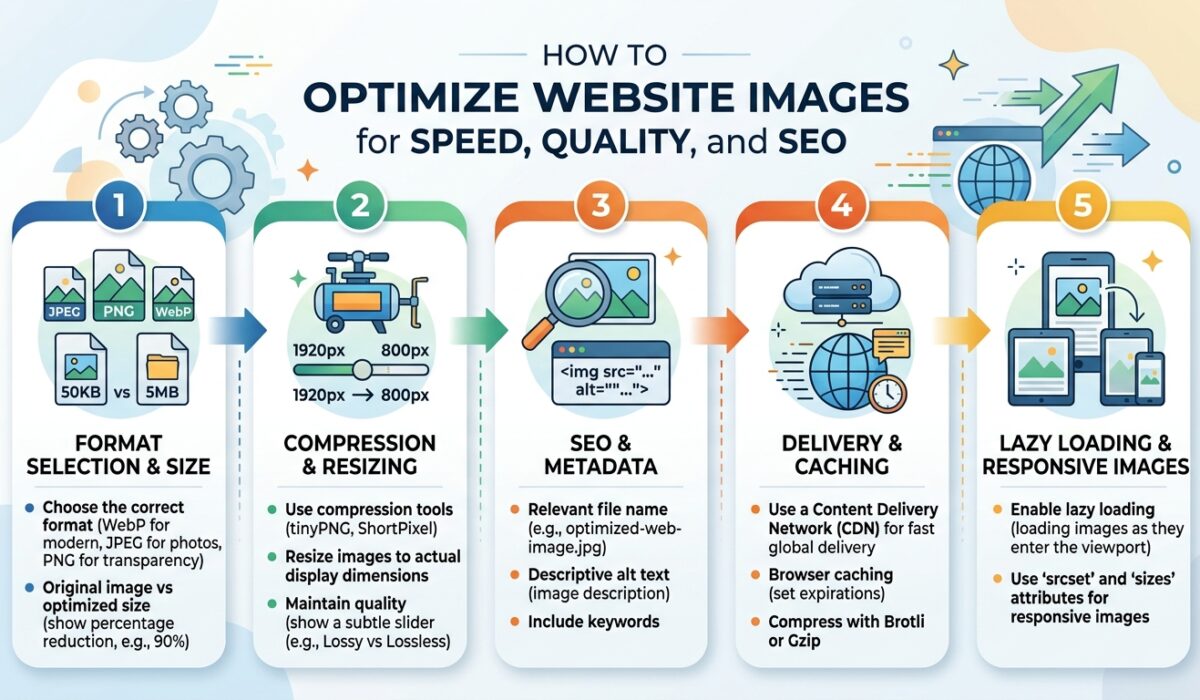
Different image formats serve different purposes. JPEG is widely used for photographs, banners, blog images, and product pictures because it can provide a useful balance between file size and visual quality.
PNG is often suitable for graphics that require transparency or sharp edges, while WebP can offer efficient compression for supported web environments. Selecting an appropriate format before uploading images can make website management more effective.
Compress JPEG Images Without Complicating Your Workflow
When photographs are too large, compression can help reduce their file size before they are uploaded to a website or shared online. The goal is to make images lighter while keeping important visual details clear.
An online tool such as Adobe Express makes this process more accessible. Using a JPEG file compressor, users can work on reducing image file sizes through a browser-based workflow instead of relying entirely on complex desktop software.
This approach can be useful for people who regularly prepare images for articles, online stores, marketing campaigns, and personal projects.
Before publishing a compressed image, review it at the size where it will appear. Check that important details remain visible and that colors, textures, and edges still look appropriate.
Practical Tips for Better Image Performance
A consistent image optimization routine can save time and improve the quality of a website’s visual content.
Consider these simple practices:
- Resize images to match their intended display dimensions.
- Compress large photographs before uploading them.
- Choose an image format that suits the content.
- Use descriptive filenames that accurately explain each image.
- Add meaningful alt text to help describe images to users who rely on assistive technology.
- Avoid uploading multiple unnecessarily large versions of the same image.
- Review image quality on both desktop and mobile screens.
These steps can help maintain a more organized and efficient publishing process.
Image Optimization for Online Businesses
Online stores and service-based businesses often depend on high-quality visuals to communicate value. Product photographs, promotional banners, and portfolio images need to look professional while remaining practical for website delivery.
Optimized images can help reduce unnecessary file weight across product pages and landing pages. For businesses with large image collections, adopting a standard compression process can also make content production more consistent.
However, compression should always be balanced with quality. Excessive compression may introduce visible artifacts, blur fine details, or make photographs look less professional.
Final Thoughts
Image optimization is a simple but valuable part of maintaining a modern website. By selecting suitable formats, resizing images correctly, and reducing unnecessary file sizes, website owners can make their visual content more efficient without compromising the visitor experience.
With a repeatable workflow and accessible online tools, preparing images for websites, blogs, and digital campaigns becomes easier and more manageable.