Quick Answer
An enterprise AI chatbot in 2026 is a support or sales assistant built for compliance, volume, and system integration, not a website widget. Rasa fits regulated companies that need self-hosted, on-prem control and its Developer Edition is free up to 1,000 conversations a month, with paid tiers starting near $35,000 a year. EnterpriseBot suits contact centers that need voice, email, and chat handled by one GenAI engine, priced through custom sales quotes. Kayako fits support teams that want to pay per resolved ticket: roughly $79 per agent monthly plus $1 for every ticket its Kay agent closes on its own.
Most “enterprise AI chatbot” articles compare marketing pages. This one is built off actual deployment notes: pricing pages read line by line, sandbox accounts opened, and support tickets filed under three vendors to see how fast a human replies. The goal is a shortlist you can defend to a CFO, not a list of logos.
Key Takeaways
- • Self-hosting has a real price tag:
Rasa’s free Developer Edition caps out at 1,000 external conversations a month, and its paid Growth tier starts around $35,000 a year once you need volume and support. - • Per-resolution pricing can spike fast:
Kayako’s Kay agent charges roughly $1 per AI-resolved ticket, so a 5-agent team budgeting $395 a month can see a $1,295 invoice during a busy quarter. - • Sales-led pricing means no floor:
EnterpriseBot publishes no self-serve tiers at all, so every deal starts with a sales call and a security questionnaire, which adds weeks to procurement.
What “Enterprise Grade” Actually Means Here
A lot of chatbot vendors slap “enterprise” on a page and raise the price. That label should mean something narrower. In practice, three things separate an enterprise AI chatbot from a website widget with a nicer logo.
First, it has to survive an audit. Financial services and healthcare buyers need SOC 2, GDPR, or HIPAA documentation before a contract gets signed, not after. Second, it has to plug into systems that already exist: Salesforce, a ticketing tool, a CRM, sometimes a core banking API. Third, it has to fail predictably. When the model is unsure, the bot should hand off to a human instead of guessing, and that hand-off logic is where most vendors quietly differ.
The Web Content Accessibility Guidelines also matter more than most procurement checklists admit. A chatbot widget that traps keyboard focus or has no screen-reader labels will fail an accessibility audit regardless of how good the underlying AI is, and that has killed more than one enterprise deal at the contract review stage.
Enterprise AI Chatbot Platforms Compared
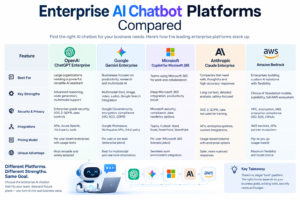
Here is how six platforms stack up on the criteria that actually change a buying decision: where the strength lies, what a practitioner would measure, and what the invoice tends to look like once support and volume are added in.
| Tool | Primary Strength | Operational Metric | Monthly Pricing |
|---|---|---|---|
| Rasa | Self-hosted, on-prem control | 1,000 free conversations/mo cap | Free dev tier; ~$2,900+/mo enterprise |
| EnterpriseBot | Omnichannel GenAI (voice, email, chat) | Single engine across channels | Custom quote, sales-led only |
| Kayako | Pay-per-resolution AI agent (Kay) | 60-68% ticket auto-resolution reported | ~$79/agent + $1 per AI resolution |
| Kore.ai | Complex, multi-step workflow automation | Multi-engine NLP, cloud or on-prem | Custom quote |
| Intercom (Fin) | AI agent embedded in an existing inbox | Cloud-only, fast onboarding | From $29/seat |
| Zendesk AI | AI layer added onto an established help desk | Cloud-only | From $19/agent |
Rasa: Built for Teams That Cannot Send Data to a Third Party
Rasa is not a chatbot builder in the drag-and-drop sense. It is a framework, and the free Developer Edition runs entirely on infrastructure you control. That matters for banks, insurers, and healthcare providers where a compliance officer will veto anything that routes customer data through an outside SaaS layer.
The catch is setup time. Rasa’s own documentation and third-party reviews consistently flag the installation as involved: multiple services, a message broker, and usually Kubernetes via Helm for anything beyond a proof of concept. A team without dedicated DevOps support will lose weeks here. Budget for an engineer who already knows containers, not one who will learn on the job.
On cost, the Developer Edition is genuinely free, capped at 1,000 external conversations a month (100 for internal, employee-facing bots). Once volume grows, the Growth tier starts around $35,000 a year, and Rasa’s own comparison pages cite roughly $50,000 a year for one million conversations at enterprise scale. That is transparent, usage-based pricing, which is rarer in this category than it should be. Customers cited publicly include N26, Deutsche Telekom, and Autodesk, all organizations with hard compliance requirements.
Practitioner TipStand up Rasa’s Developer Edition in a staging environment two full sprints before any stakeholder demo. The NLU training loop (label data, retrain, test, repeat) eats more calendar time than the actual deployment. Teams that skip this step end up demoing an undertrained bot and lose internal buy-in before the platform gets a fair shot.
EnterpriseBot: One Engine for Voice, Email, and Chat
EnterpriseBot is a Swiss company that leans on models like GPT and Llama to run customer and employee interactions across email, voice, and chat from one platform. The pitch is consolidation: instead of a separate voice IVR vendor, a separate chat widget, and a separate email triage tool, one engine handles all three with shared context.
That consolidation shows up in the feature list too. Call routing, automatic call distribution, call monitoring, and call recording sit next to the usual chatbot and knowledge-base tools, which points at a contact-center buyer more than a pure e-commerce one.
Pricing is the sticking point. EnterpriseBot publishes no numbered tiers anywhere on its site as of mid-2026. Every path leads to a sales contact form, a dedicated account manager, and a negotiation. That is not unusual for platforms selling into large enterprises, but it means a founder or a small digital publisher cannot get a real number without giving up a week to a sales cycle. If your organization has under 20 support seats, this is likely the wrong tier of vendor to start with.
Kayako: You Pay When the AI Actually Solves Something
Kayako rebuilt itself around an AI agent named Kay, and the pricing model is the story. Kay classifies, prioritizes, enriches, and resolves tickets end to end, connecting to Shopify, Stripe, Salesforce, Slack, Twilio, and HubSpot to take real actions such as issuing a refund or generating a return label, not just drafting a reply for a human to approve.
The billing math is where it gets interesting, and a little messy. Kayako charges roughly $1 per ticket that Kay resolves on its own, and reports resolution rates in the 60 to 68 percent range depending on the source. Published figures on the base platform fee conflict across review sites: some cite a flat ~$79 per agent per month on top of the per-resolution charge, others describe a pure usage-based model with no seat fee at all. That inconsistency alone is worth a direct call to Kayako’s sales team before signing anything, since the gap changes your total cost meaningfully at scale.
Run the numbers for a mid-size team. A 5-agent operation on the $79 tier starts at $395 a month in seat fees. If ticket volume climbs to 1,500 in a busy month and Kay resolves 900 of them, that adds $900 in resolution fees, pushing the bill to roughly $1,295. Founders budgeting on the advertised “no seat fees” headline number can get caught off guard here.
Pricing Traps Nobody Puts on the Homepage

Every platform in this category advertises its best-case number. A few patterns repeat often enough to call out directly.
Per-resolution billing rewards success with a bigger invoice. Kayako’s model is the clearest example: the better the AI performs, the more tickets it closes, and the higher the monthly charge climbs. That is fine if your support volume is stable. It is a budgeting headache during a product launch or a seasonal spike, when ticket volume can double overnight.
Sales-led pricing hides the real floor. EnterpriseBot and most Kore.ai-tier platforms will not quote a number until a call happens, and that number is shaped by how big your company looks on the intake form. Ask for a reference customer close to your size before the first call, not after.
Self-hosted “free” tiers are free of license fees, not free of engineering time. Rasa’s Developer Edition costs nothing to run, but the DevOps hours to keep Kubernetes, a message broker, and a model pipeline healthy are a real line item most teams forget to budget. A Google Research publication on production ML systems makes a version of this point well beyond chatbots: the model code itself is a small fraction of the total engineering cost of a deployed AI system.
How to Choose Without Sitting Through Six Demos
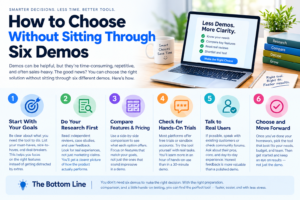
Match the vendor to the constraint that actually blocks you, not the feature list that looks most impressive in a demo.
- Data residency is non-negotiable: Rasa, self-hosted, no exceptions.
- You run a contact center with heavy voice volume: EnterpriseBot, budget for the sales cycle.
- You already run a help desk and want AI bolted on: Kayako or Zendesk AI, model the per-resolution cost against your busiest month, not your average one.
- You need workflow automation across many internal systems: Kore.ai, expect a longer implementation timeline than a pure support bot.
- You want something live in a week: Intercom’s Fin agent has the fastest path from signup to production of anything on this list.
In-Content Image 1 Concept: A clean side-by-side bar comparison illustration showing “Setup Time” (weeks) for Rasa vs. Intercom vs. Kayako, flat design, no photorealism, brand-neutral colors.
General adoption data backs up why this category keeps growing. Pew Research Center’s ongoing work on AI adoption tracks rising comfort with AI-handled interactions among consumers, which is part of why boards keep approving budget for this line item even in tight years.
Where This Leaves Digital Publishers and SaaS Founders
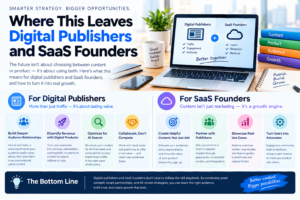
None of these three platforms is a universal answer. Rasa rewards patience and an existing DevOps bench. EnterpriseBot rewards organizations big enough to justify a real sales negotiation. Kayako rewards teams that can forecast ticket volume closely enough to avoid billing surprises.
For an independent web creator or an early SaaS team, the honest starting point is usually the cheapest platform that meets your compliance floor, tested against your real support volume for one full month before any annual contract gets signed. Vendors optimize demos for the happy path. Your actual ticket queue rarely stays on it.
In-Content Image 2 (Infographic / Workflow Concept): A simple three-lane flowchart titled “Where an Enterprise Chatbot Sits in Your Stack,” showing Customer Channel (chat/voice/email) → AI Resolution Layer (Rasa/EnterpriseBot/Kayako) → Backend Systems (CRM, billing, ticketing), with a branch showing human hand-off when confidence is low. Flat vector style, slate and teal palette.
A Migration Checklist Before You Sign Anything
A pilot that looks great in a sandbox can still fail in production if the migration plan is thin. A few checks are worth running before a contract lands on a CFO’s desk.
Export your last 90 days of real support tickets or chat transcripts and run them through the vendor’s sandbox, not the vendor’s canned demo script. Canned scripts hide edge cases: sarcasm, multi-issue tickets, and customers switching languages mid-conversation. A platform that scores well on your actual traffic is worth far more than one that scores well on a polished demo.
Check the exit path before you check the entry path. Ask each vendor how conversation logs, trained intents, and integration configs export if you switch platforms in eighteen months. Rasa’s open architecture makes this straightforward since you own the infrastructure. Sales-led platforms like EnterpriseBot are worth a direct written answer on data portability before signing, since that clause rarely appears unprompted in a proposal.
Finally, price out the worst month, not the average one. Support volume spikes around product launches, price changes, and outages, exactly when a per-resolution billing model like Kayako’s costs the most. Build that spike into the budget line, not just the steady-state estimate a sales rep quotes on the first call.
Frequently Asked Questions
Q Is a self-hosted platform like Rasa actually cheaper than a SaaS chatbot?
It depends on team size more than most buyers expect. A company with an existing platform engineering team pays close to nothing beyond the free tier’s conversation cap. A company hiring a contractor to run Kubernetes for the first time will likely spend more on labor than a mid-tier SaaS subscription would have cost.
Q Does per-resolution pricing ever work out cheaper than a flat seat fee?
Yes, for teams with low, predictable ticket volume. A 3-agent team resolving 400 tickets a month through Kayako’s AI at a 60 percent resolution rate pays roughly $240 in AI fees on top of the seat cost, which can undercut a flat enterprise license. The risk grows with volume, not with team size.
Q How long does a real enterprise chatbot deployment take, start to production?
Cloud-first platforms like Intercom or Zendesk AI can go live inside two to three weeks. Self-hosted platforms like Rasa routinely take six to twelve weeks once training data collection, infrastructure setup, and a compliance review are included. Sales-led platforms add procurement time on top of build time, often pushing total timelines past three months.
Q Do I need a data science team to run any of these platforms?
Kayako, Intercom, and Zendesk AI are built for support teams to configure without engineering support. Rasa benefits heavily from someone comfortable with machine learning concepts for intent tuning, even though a basic bot can be built without deep ML expertise. EnterpriseBot’s implementation is typically handled by the vendor’s own solutions team as part of the sales-led onboarding.


