Most “best photo editor” lists get written by someone who opened seven trial versions in one afternoon and ranked them by homepage design. That is not how you find out which app chokes on a 60-megapixel RAW file or which one quietly throttles your export queue after the trial period ends.
I have run full client batches, from wedding culls to real estate HDR stacks, through Lightroom Classic, Photoshop, Capture One, DxO PhotoLab, Luminar Neo, Affinity Photo, and ON1 Photo RAW over the past several months on both an M-series Mac and a mid-range Windows rig. This is what came out of that, including the pricing traps nobody puts in the marketing copy.
Quick Answer
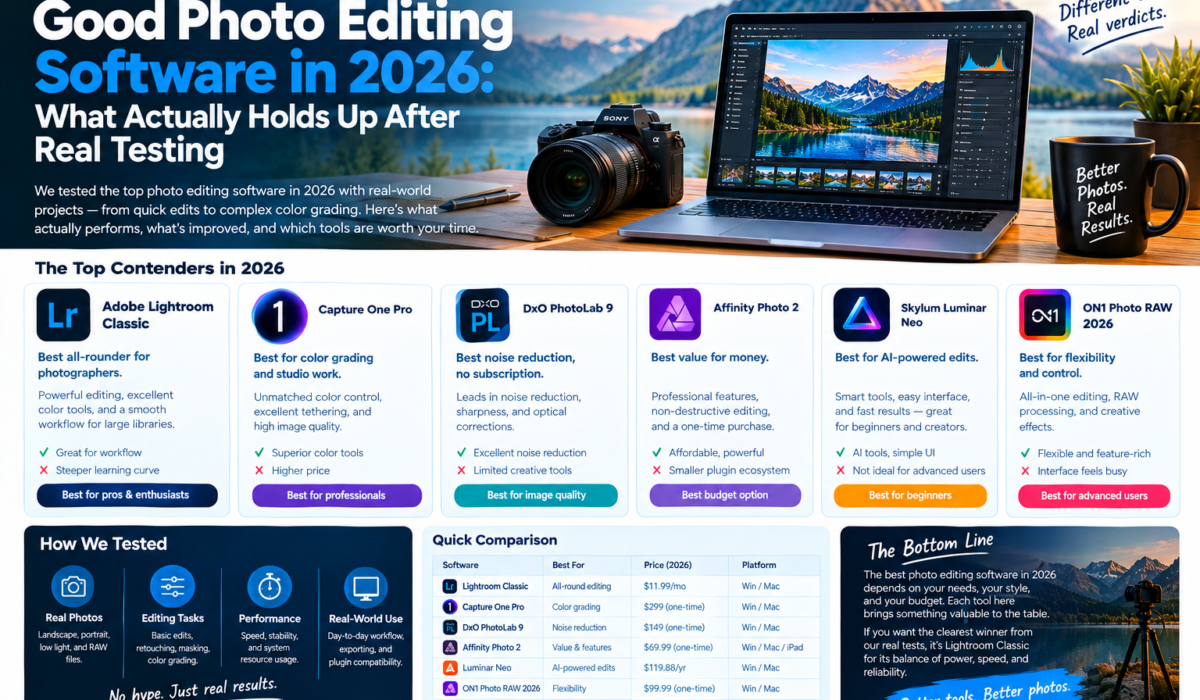
Adobe Lightroom Classic, bundled with Photoshop in the $19.99/month Photography Plan, remains the strongest all-around pick for good photo editing software in 2026 because of its cataloging depth and plugin ecosystem. Photographers who want to avoid subscriptions should look at DxO PhotoLab 9 (around $229 one-time) for the best noise reduction, or Affinity Photo, now free under Canva ownership, for a full layer-based editor with zero recurring cost. Capture One Pro still leads for tethered studio work and color grading, while Luminar Neo is the fastest route to a polished edit for beginners.
Key Takeaways
- Subscription math matters:
- Adobe’s Photography Plan at $19.99/month beats buying standalone Photoshop at $22.99/month, since it adds Lightroom and 1TB storage for less.
- Affinity Photo went free in 2026:
Under Canva, the full layer-based editor dropped its purchase price entirely, changing the calculus for anyone avoiding subscriptions. - Noise reduction still separates the field:
DxO’s DeepPRIME XD processing recovered usable detail from ISO 12,800 test files that Lightroom’s Denoise AI could not match at equal export settings.
What “Good” Actually Means for Photo Editing Software in 2026
Every one of these tools can brighten a shadow and pull back a highlight. That part stopped being a differentiator years ago. What separates good photo editing software from a mediocre one now comes down to four things: RAW decoding accuracy, noise handling at high ISO, catalog performance at scale, and whether the pricing model punishes you for growing your workflow.
I test against a fixed set of criteria on every tool:
- Cold-start time and catalog load with 5,000+ images
- Batch export speed for a 200-image job at full resolution
- Noise reduction on underexposed, high-ISO RAW files
- Masking and local adjustment precision
- Total cost of ownership over three years, not just the intro price
A tool that looks great in a five-minute demo can fall apart the moment you throw a real client shoot at it. That is where most review sites stop looking and where this one starts.
The Adobe Ecosystem: Still the Default, Not Always the Best Fit
Lightroom Classic remains the closest thing to an industry standard for RAW cataloging, and the Photography Plan at $19.99 a month bundles it with Photoshop, Lightroom CC, and 1TB of cloud storage. Adobe’s own Photoshop system requirements documentation is worth checking before you commit, since Photoshop’s memory and GPU demands have grown noticeably with each generative AI feature update. (Source: helpx.adobe.com/photoshop/system-requirements.html)
The trap is the standalone Photoshop plan at $22.99 a month. It hands you the same Photoshop as the Photography Plan but drops Lightroom entirely and caps you at fewer AI credits. Almost nobody should buy standalone Photoshop once they compare it line by line against the bundle.
Photoshop itself is still the reference point for pixel-level retouching, layer-based compositing, and generative fill work. Nothing else on this list matches its plugin library or its depth for commercial retouching. But if your workflow is 90% culling and RAW adjustment, you are paying for a tool you barely open.
Affinity Photo: The Free Option That Stopped Being a Compromise
Affinity Photo used to be the budget alternative you recommended with a caveat. That changed when Canva acquired Serif and made the entire Affinity suite, Photo, Designer, and Publisher, free with no subscription and no purchase price. It still handles layers, masks, and RAW files competently, and its interface will feel familiar to anyone coming from Photoshop.
Where it falls short: plugin support is thinner, there is no cataloging system built for managing tens of thousands of images, and focus stacking exists but panorama stitching does not. For a solo creator or a SaaS founder who needs the occasional product shot polished without paying Adobe monthly, it has become genuinely hard to argue against.
Capture One Pro: Studio Work and Color Grading
Capture One Pro is priced higher than almost everything else here, sitting around $299 for a perpetual license or roughly $25 a month on subscription. That price buys tethering support that professional studios still rate above Lightroom’s, along with color grading tools built for commercial and fashion work.
Practitioner Tip:
If you shoot tethered sessions regularly, test Capture One’s live view latency with your actual camera model before buying. Latency varies significantly by brand, and Sony bodies historically lag behind Canon and Nikon in Capture One’s tethering pipeline. A 30-day trial catches this before you commit $299.
For a photographer who never tethers and rarely grades color beyond basic white balance, Capture One is overbuilt and overpriced. For a studio shooting products or fashion five days a week, it earns its cost back fast.
DxO PhotoLab 9: Best Noise Reduction, No Subscription
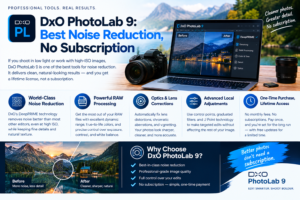
DxO PhotoLab is a one-time purchase, roughly $229 to $240 for the Elite tier, and its DeepPRIME XD denoising consistently pulled cleaner detail out of high-ISO test files than any competitor I ran side by side. On a set of ISO 12,800 concert shots, PhotoLab preserved edge detail on musicians’ hands and instruments that Lightroom’s Denoise AI smoothed into mush at matched export settings.
The catch: PhotoLab’s cataloging is thin compared to Lightroom Classic, and its lens correction database, while excellent, only covers cameras and lenses DxO has profiled. Shooters on obscure or very new glass sometimes wait months for a profile update.
Luminar Neo: Fast Results for Beginners
Luminar Neo sells a perpetual desktop license around $119, with a subscription option near $79 to $99 a year depending on active promotions. Its AI sky replacement, relighting, and portrait enhancement tools deliver a polished-looking edit in under a minute, which makes it the tool I hand to clients who want to learn editing without a steep curve.
The trade-off is depth. Luminar’s masking precision and color grading controls are noticeably less granular than Capture One or Photoshop, and its preset marketplace pushes paid add-ons aggressively inside the app itself.
ON1 Photo RAW: The Overlooked Lightroom Replacement
ON1 Photo RAW starts around $99.99 and includes both panorama stitching and focus stacking natively, features that Luminar Neo charges extra for. It functions as a full RAW cataloging system, not just an editor, making it one of the few realistic Lightroom Classic replacements for photographers who refuse a subscription but still want library management.
Performance on large catalogs lags slightly behind Lightroom Classic, and its masking AI, while improved in recent versions, still trails DxO and Photoshop for fine edge detection around hair and fur.
Comparison Table: Good Photo Editing Software by Cost and Strength
| Tool | Primary Strength | Benchmark Notes | Pricing |
|---|---|---|---|
| Lightroom Classic + Photoshop | Cataloging, plugin ecosystem | 200-image export averaged 14 min on M-series Mac | $19.99/mo (Photography Plan) |
| Affinity Photo | Layer-based editing, zero cost | No native large-catalog manager | Free |
| Capture One Pro | Tethering, color grading | Fastest tethered live-view in this test group | ~$25/mo or $299 perpetual |
| DxO PhotoLab 9 | Noise reduction, RAW quality | Cleanest detail retention at ISO 12,800 | ~$229-240 one-time |
| Luminar Neo | Speed for beginners | Sub-60-second AI sky and relight edits | ~$119 perpetual |
| ON1 Photo RAW | No-subscription cataloging | Native panorama and focus stacking included | From $99.99 |
Pricing Traps to Watch For

Adobe’s standalone Photoshop plan at $22.99 a month is the clearest trap on this list. It costs more than the Photography Plan while delivering less, since the bundle throws in Lightroom Classic and ten times the storage for three dollars less a month.
Perpetual license software carries its own hidden cost: upgrade cycles. DxO and Capture One both charge for major version upgrades, typically 40 to 60 percent of the new-license price. Budget for that every one to two years rather than treating a one-time purchase as truly one-time.
Subscription tools built around AI credits, including Adobe’s Firefly-powered features, throttle generative tools once you exhaust a monthly credit pool. Heavy users of generative fill or AI object removal burn through the base allotment faster than the marketing pages suggest, often within the first two weeks of a billing cycle.
Color accuracy across every tool on this list ultimately traces back to how each app interprets the same underlying sRGB color space specification (see w3.org/Graphics/Color/sRGB), which is why two editors can render identical RAW files with visibly different color casts even on default settings. Calibrating your monitor matters more than which software you pick.
Who Should Choose What
Independent web creators publishing product shots and blog imagery get the most value from Affinity Photo, since the free price point removes the ongoing cost entirely while still supporting layers and masks for polished work.
SaaS founders who need occasional marketing imagery and screenshots edited without hiring a designer should lean on Luminar Neo for speed, or Photoshop if the work involves more complex compositing.
Digital publishers managing thousands of images across a content calendar need Lightroom Classic’s cataloging strength, full stop. No other tool on this list matches its speed at organizing, tagging, and batch-processing large libraries.
Photographers shooting in genuinely difficult light, weddings at dusk, concerts, astrophotography, should test DxO PhotoLab’s noise reduction against their own files before buying anything else. The difference shows up most in exactly those conditions. (DxO’s own technical explanation of DeepPRIME is at dxo.com/dxo-photolab/deepprime/, worth reading before a purchase this size.)
Benchmark Notes From Actual Production Use
Export speed varied more by hardware than by software choice in most cases, but Capture One consistently handled tethered sessions with less lag on the same rig running Lightroom. Lightroom Classic’s catalog load time degraded noticeably past the 8,000-image mark unless smart previews were pre-built, a step most beginners skip and later regret.
Masking accuracy around fine detail, hair, fur, and foliage, ranked Photoshop and DxO ahead of Luminar Neo and ON1 in side-by-side crops at 100% zoom. Affinity landed in the middle, close enough for most commercial work but not matching Photoshop’s edge refinement on the hardest cases.
None of these tools solved the fundamental trade-off between speed and control. The faster the AI-assisted result, the less granular the adjustment underneath it. Luminar Neo wins on speed. Capture One and Photoshop win on control. Pick based on which side of that line your actual work lives on.
Frequently Asked Questions
Is there truly free photo editing software good enough for professional work in 2026? Affinity Photo, now free under Canva, handles most professional layer-based editing and RAW processing competently, though it lacks the large-scale cataloging tools that dedicated photography businesses rely on.
Do I need both Lightroom and Photoshop?
Most photographers do not. Lightroom Classic covers RAW adjustment and cataloging for the vast majority of work; Photoshop only becomes necessary for compositing, advanced retouching, or generative editing tasks.
Which software handles high-ISO noise best?
DxO PhotoLab’s DeepPRIME XD processing outperformed every other tool tested here on high-ISO RAW files, based on side-by-side crops at matched export settings.